How I Optimized My Docker Images
I used to treat Dockerfiles as a packaging step that came after the real work. If the app ran locally, I would write the quickest Dockerfile possible, ship it, and move on.
That worked until image pulls got slow, CI builds started taking longer than they should, and every tiny source change seemed to rebuild far more than necessary. I needed to understand what Docker was building and why a small edit could trigger so much work. Looking at the layers gave me a way to reason about both the build cache and the final image.
By Sourabh Malviya.
What made the difference for me
- Copy dependency manifests before source code so ordinary edits don't reinstall everything.
- Use multi-stage builds and copy only what the running application needs.
- Compare image size, compressed archives, and runtime behavior separately.
How Docker layers changed my approach
I find it easier to reason about a Docker image as a stack of filesystem changes. Each layer contributes something, and I want to know whether that contribution is worth rebuilding or shipping.
Instructions such as COPY, ADD, and RUN can contribute filesystem layers. Those layers are immutable: once a layer is built, Docker does not mutate it in place. If something changes, Docker creates a different layer and reuses the old unchanged ones where it can.
That immutability is what makes caching work.
- If a layer does not change, Docker can reuse it.
- Within a dependent build-stage chain, a changed step invalidates later cached steps. Independent stages can still reuse their cache.
- A container then adds one writable layer on top of the image at runtime.
That one idea changed how I write Dockerfiles. I stopped thinking in terms of "commands" and started thinking in terms of "which layers are expensive, and how often do they change?"
This is the ordering I'd avoid:
COPY . .
RUN bun install
RUN bun run build
With this order, changing one application file invalidates the COPY . . layer. I've made the dependency install depend on the whole source tree, so that step runs again too.
I'd move the dependency manifests ahead of the source copy:
COPY package.json bun.lock ./
RUN bun install --frozen-lockfile

COPY . .
RUN bun run build
Now a normal source edit can reuse the install layer. Changes to the manifests, base image, or other inputs to that step can still invalidate it. Docker explains this ordering in its build-cache guide.
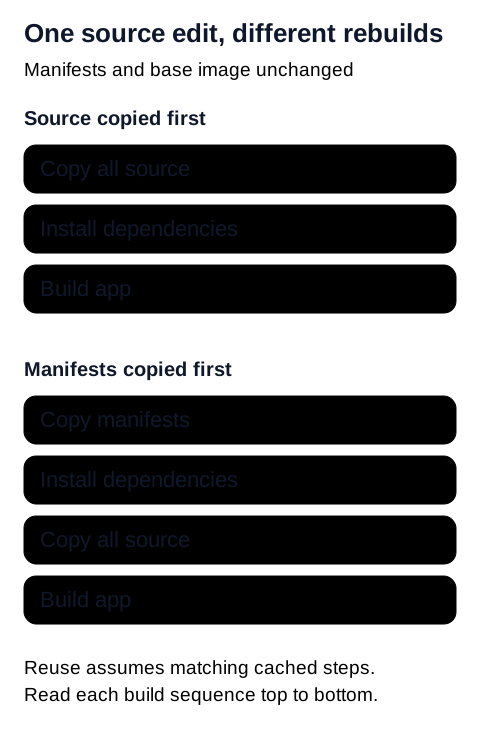
I also want a small build context. An example .dockerignore for this layout is:
.git
**/node_modules
**/.next
**/dist
.env
.env.*
!.env.example
I'd adapt that list to the files the build actually consumes. If the Dockerfile copies a generated artifact from the host, excluding it would break the build. Private credentials need a different path: I'd supply them through build secrets rather than copy them into the image.
A quick note on immutability
When people say Docker layers are immutable, they do not mean containers are read-only. They mean the image layers themselves are content-addressed snapshots. You do not "edit" layer 5. You build a new layer stack that reuses layers 1 through 4 and replaces whatever changed after that.
That matters for both size and speed:
- Reused layers mean faster builds and faster pulls.
- Stable early layers improve CI cache hit rates.
- Smaller final layers reduce the amount of data shipped to registries and servers.
So image optimization is really about controlling how much filesystem data each layer contains, how often it changes, and whether it belongs in the final runtime image at all.
Staging means multi-stage builds
When I talk about staging here, I mean build stages inside the Dockerfile, not a staging environment.
I use separate stages to make each part of the build explicit:
- one stage installs dependencies
- one stage builds the app
- one stage runs the app
That lets me decide exactly what reaches the final image. The compiler and other build tools can stay in an earlier stage; I only copy the artifacts the running app needs.
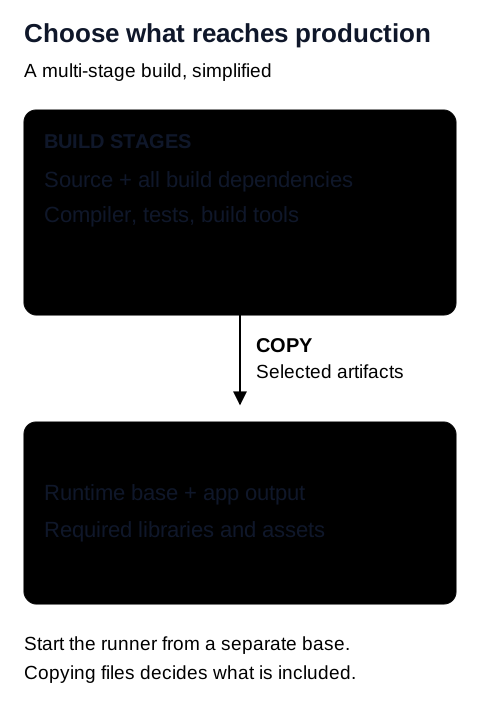
Here's a simplified example of that separation:
FROM node:22-slim AS base
WORKDIR /app
FROM base AS deps
COPY package.json package-lock.json ./
RUN npm ci
FROM base AS builder
COPY /app/node_modules ./node_modules
COPY . .
RUN npm run build
FROM base AS production-deps
COPY package.json package-lock.json ./
RUN npm ci --omit=dev
FROM node:22-slim AS runner
WORKDIR /app
ENV NODE_ENV=production
COPY /app/dist ./dist
COPY /app/node_modules ./node_modules
COPY /app/package.json ./package.json
USER node
CMD ["node", "dist/server.js"]This example assumes npm run build produces dist/server.js and that the app's runtime files are covered by those copies. The separate production install matters: copying node_modules from the build stage would also ship dev dependencies. Keep any runtime configuration or assets your application actually needs. Docker's multi-stage build documentation explains how selective copying keeps build artifacts out of the final stage.
The image tags in these examples show the layout, not a promise of an up-to-date deployment. Choose a supported, patched runtime and record its resolved image digest when reproducing a size comparison.
Base image choice changes more than image size
Once I'd separated the build from the runtime, I could make a more useful comparison between base images. I wanted to know what each variant removed and whether my app depended on it.
For the same runtime, you usually get multiple variants:
- regular or full image
slimalpine- distroless images
I don't choose between these on size alone. Native dependencies and the way I debug a running service matter too.
Full vs slim vs Alpine vs distroless
Full images
These are the most forgiving. They include more system packages and usually make debugging easier. They are also the largest and often ship more than your app actually needs.
I use them when I am still figuring out native dependencies or debugging a build.
Slim images
For a Node.js app, this is the production starting point I'd try first.
For the official Node.js image, slim keeps a Debian-based userspace with fewer packages. That reduces the installed package set while keeping the same libc family. I'd still check any system libraries the app needs.
For me, that makes slim a useful starting point for balancing compatibility and size.
Alpine
Alpine images are small, but the smaller number is not free.
The big difference is that Alpine uses musl instead of glibc, as the official Node.js image documentation explains. For pure JavaScript apps that may be fine. For apps with native modules, image processing, database drivers, or other prebuilt binaries, that difference can turn into extra work fast.
I only pick Alpine when:
- I know my dependency tree works cleanly on
musl - I actually benefit from the smaller footprint
- I am okay trading some convenience for that smaller base
If you switch to Alpine and suddenly need extra compatibility packages or custom rebuild steps, the original size win can disappear quickly.
Distroless
Distroless images strip the runtime down even further. You usually get the runtime and the minimum libraries needed to execute the app, but no package manager and usually no shell.
That makes distroless attractive for production because:
- the final image is smaller
- fewer installed components can reduce attack surface
- there is less stuff to accidentally rely on
But there is a cost: debugging inside the container becomes harder. If you are used to dropping into a shell and poking around, distroless will force you to be more intentional.
The distroless project documents its runtime and debugging variants. A smaller image still needs dependency updates and scanning.
My rule is:
- use full images while debugging
- start with
slimwhen I want a familiar Debian environment with fewer packages - use Alpine only when I know the stack is compatible
- use distroless when I want a very tight runtime image and operational constraints are acceptable
What I leave out of the runtime image
Before I spend more time comparing base tags, I look at what I'm copying. A small base image won't help much if I put the entire build workspace on top of it.
Typical waste looks like this:
- source files that are not needed at runtime
- TypeScript sources after compilation
- dev dependencies
- package manager caches
- test files
- build tools
- temporary assets produced during install
This is where the separate runtime stage earns its place. I can inspect its COPY instructions and explain why each file belongs there.
An optional second pass with SlimToolkit
SlimToolkit can inspect and minify a built image. I think of it as a second pass after fixing the Dockerfile structure:
slim xray my-image:latest
slim build my-image:latest
The tradeoff is coverage. A slimming run might not exercise dynamically loaded files, rare request paths, or an external command that the app needs later. Test the resulting image against those paths before using it.
I'd start with ordinary multi-stage builds because the files being copied remain explicit. Also check the release you install: the project's issue tracker includes a report about CVE-2024-45337 in a distributed build. That report isn't proof that every release is affected, but it is a reason to verify the actual binary rather than assume an optimization tool is safe by default.
What I copy from Next.js standalone output
For my Next.js app, standalone output gives me a smaller set of files to copy into the runtime stage. I enable it in the Next.js configuration:
const nextConfig = {
  output: "standalone",
};

export default nextConfig;
When you build with standalone output, Next.js creates a .next/standalone directory with the minimal server output and traced runtime dependencies needed to run the app. That changes the final Docker stage completely, because you no longer need to copy the whole project into production.
Instead, the runtime stage can copy just:
.next/standalone.next/staticpublic
Here is a practical example for a single Next.js app with a public directory:
FROM node:22-slim AS base
WORKDIR /app
FROM base AS deps
COPY package.json package-lock.json ./
RUN npm ci
FROM base AS builder
COPY /app/node_modules ./node_modules
COPY . .
RUN npm run build
FROM node:22-slim AS runner
WORKDIR /app
ENV NODE_ENV=production
ENV PORT=3000
ENV HOSTNAME=0.0.0.0
COPY /app/.next/standalone ./
COPY /app/.next/static ./.next/static
COPY /app/public ./public
USER node
EXPOSE 3000
CMD ["node", "server.js"]Next.js doesn't automatically copy public and .next/static into standalone output, so those explicit copies matter. If your app has no public directory, omit that copy. The standalone output documentation also explains tracing limits and additional configuration for monorepos.
There are two details I'd check before using this layout:
- For Next.js image optimization, check the framework's requirements for
sharpand confirm that it reaches the standalone output. - I'd still copy lockfiles before source files. Standalone output reduces what I ship; layer ordering determines what I rebuild.
A brief note on Turborepo
In a monorepo, I also need to decide which workspaces belong in an app's build.
Turborepo can prune a monorepo down to the source, manifests, and lockfile entries needed for a specific app. Its prune reference describes the split out/json and out/full output used below.
That matters because monorepos are easy to accidentally over-copy:
- unrelated apps get included in the build context
- unrelated package changes invalidate cache
- dependency installation ends up considering more workspaces than necessary
I use turbo prune --docker to produce the target app's workspace subset. The split output fits the layer ordering above: dependency manifests first, then the source needed to build that app.
How that looks in my Next.js + Turborepo Dockerfile
In my case, the flow looks like this. These workspace names belong to my project; replace them with yours. This version assumes turbo is a root dev dependency recorded in the Bun lockfile. The prepare-stage install makes that local executable available without downloading an unpinned turbo@latest.
FROM oven/bun:1.3.4-alpine AS base
WORKDIR /app
FROM base AS prepare
COPY . .
RUN bun install --frozen-lockfile
RUN bunx --no-install turbo prune @work-intelligence/web --docker
FROM base AS builder
COPY /app/out/json .
RUN bun install --frozen-lockfile
COPY /app/out/full .
RUN bunx --no-install turbo build --filter=@work-intelligence/web...
FROM base AS runner
ENV NODE_ENV=production
ENV PORT=3000
ENV HOSTNAME=0.0.0.0
COPY /app/apps/web/.next/standalone ./
COPY /app/apps/web/.next/static ./apps/web/.next/static
# Include this if the app has public assets:
# COPY --from=builder --chown=bun:bun /app/apps/web/public ./apps/web/public
USER bun
EXPOSE 3000
CMD ["bun", "apps/web/server.js"]What I like about this structure:
- the
preparestage usesturbo prune @work-intelligence/web --dockerto isolate only the web app and its required workspace packages out/jsonis copied before installation so Bun can cache dependency resolution cleanlyout/fullis copied only after dependencies are installed, which avoids reinstalling everything on every source change- the final runtime stage only gets the standalone server output and static assets
The prepare stage still receives the repository allowed by .dockerignore; pruning reduces what the later stages install and build. It doesn't retroactively reduce that initial context. A monorepo may also need outputFileTracingRoot set to the workspace root so Next.js includes shared runtime files.
Running the standalone server with Bun is a project-specific choice here. Check the Next.js features and native modules your app uses before switching away from the Node.js runtime in the earlier example.
In my original measurements, this kind of optimization brought the Next.js image down from roughly 2 GB to about 256 MB uncompressed. I also recorded a compressed size of around 65 MB. The measurement caveat below matters when comparing these numbers.
Bun servers have two very different deployment paths
For Bun-based servers, I think about deployment in two buckets.
1. Bundle to JavaScript and run with Bun
If I still want the Bun runtime in the final container, I can bundle the entrypoint into a smaller output file and run that.
bun build src/server.ts --target=bun --outfile dist/server.jsThat produces a JavaScript bundle optimized for Bun. The final container can then use a Bun base image and ship only the built output plus required assets.
2. Compile to a standalone executable
The other option I'd compare is a standalone executable:
bun build src/server.ts --compile --outfile dist/serverBun's standalone executable documentation explains that the executable includes the Bun runtime. You don't need a separate Bun installation, but that doesn't mean the binary is automatically smaller than every bundled deployment. Match its operating system, CPU architecture, and libc target to the final image, and account for external assets and native dependencies.
To show where compilation fits, here's a minimal Dockerfile sketch. It assumes the binary and base image are compatible; I'd add the app's required assets and a non-root runtime user before deploying it:
FROM oven/bun:1 AS builder
WORKDIR /app
COPY package.json bun.lock ./
RUN bun install --frozen-lockfile
COPY . .
RUN bun build src/server.ts --compile --outfile dist/server
FROM debian:bookworm-slim AS runner
WORKDIR /app
COPY /app/dist/server ./server
CMD ["./server"]Whether I choose the bundled .js output or the compiled binary depends on the server:
- If I want the simplest Bun-native workflow, I ship the bundled
.jsfile and run it with Bun. - If I want the smallest and cleanest runtime artifact, I test
--compileand ship the executable.
The nice part is that Bun supports both models, so I do not have to force every service into the same container strategy.
How that looks in my Bun + Turborepo server image
For my server app, I use the same pruning approach as the Next.js app. The build produces a runnable binary, so the final copy comes from the server's dist directory.
The Dockerfile looks like this:
FROM oven/bun:1.3.4-alpine AS base
WORKDIR /app
FROM base AS prepare
COPY . .
RUN bun install --frozen-lockfile
RUN bunx --no-install turbo prune @work-intelligence/server --docker
FROM base AS builder
COPY /app/out/json/ .
RUN bun install --frozen-lockfile
COPY /app/out/full/ .
RUN bunx --no-install turbo build --filter=@work-intelligence/server...
FROM base AS runner
COPY /app/apps/server/dist/ .
USER bun
EXPOSE 3001
CMD ["./server"]I read this Dockerfile in four parts:
- the
preparestage uses the lockfile-installed Turbo and runsturbo prune @work-intelligence/server --dockerto trim the monorepo to only the server app and the workspaces it depends on - the
builderstage installs dependencies from the pruned JSON output first, which gives better cache reuse than copying the entire repository up front - the full pruned source is copied only after dependency installation, so ordinary code changes do not force a full reinstall
- the
runnerstage copies only the builtdistoutput, which keeps the final image much smaller than shipping the whole app source tree
In this setup, Bun is doing double duty for me:
- it is the package manager used during install
- it is also part of the toolchain that produces the final runnable server artifact
And Turborepo is doing exactly what I want in Docker: keeping the build graph focused on one service instead of dragging the whole monorepo into every image build.
This runner still inherits the Bun base image. The compiled binary contains Bun too, so this example prioritizes the known environment over proving the smallest possible runtime. A separate minimal runner needs its own compatibility test.
For the server image, I originally recorded roughly 1 GB before optimization, about 165 MB uncompressed afterward, and around 45 MB compressed.
My original image-size notes
| Application | Before, uncompressed | After, uncompressed | Recorded compressed size |
|---|---|---|---|
| Next.js web app | About 2 GB | About 256 MB | About 65 MB |
| Bun server | About 1 GB | About 165 MB | About 45 MB |
These are approximate observations from my setup, not a controlled benchmark or a fresh run of the revised examples. The original post didn't record image digests, architecture, compression settings, or a registry manifest alongside them. I wouldn't use them to promise a particular percentage reduction.
How I compare Docker image sizes
Local image size, a compressed export, and registry transfer size are different measurements. To compare local images, record their size in bytes:
docker image inspect my-image:before --format '{{.Size}}'
docker image inspect my-image:after --format '{{.Size}}'
Keep the target architecture, build inputs, and method consistent. For registry transfers, already-cached layers also affect how much a client actually downloads.
For a separate local archive comparison on macOS or Linux, I'd export the image and compress it with gzip:
docker save my-image:latest | gzip > my-image.tar.gz
ls -lh my-image.tar.gz
If I want the original uncompressed tar size too, I usually do:
docker save -o my-image.tar my-image:latest
ls -lh my-image.tar
gzip -c my-image.tar > my-image.tar.gz
ls -lh my-image.tar.gz
A gzipped docker save archive is a local comparison artifact, not the exact registry download size. Registries store compressed layers with their own descriptors, and a pull may reuse layers already present. For a registry comparison, inspect the manifest for the same platform and compare its layer sizes. See Docker's image save reference and the OCI image-manifest specification.
Smaller images also don't prove that the application uses less RAM. That's a separate investigation; my JavaScript memory-leak post covers retained objects and runtime memory measurements.
What I carry into the next Dockerfile
I now have a sequence to work through instead of guessing which tag might make an image smaller:
- I put stable, expensive steps early so their layers can be reused.
- I separate build and runtime with multi-stage builds.
- I check base image compatibility before comparing size.
- I copy only the artifacts the running app needs.
- I check whether the framework provides an output format intended for deployment.
The size notes above are useful to me as observations from that work. For the next comparison, I'd record the architecture, image digests, and measurement method alongside the numbers so I can explain what changed.
That's what I want from an optimized Dockerfile: I can explain why each layer gets rebuilt, why each file reaches production, and what I've actually measured.