Spring AI Tool Calling and Tool Search
Tool calling lets a model request a capability implemented by your application. You describe the capability and its inputs; the model proposes a call, and Spring AI executes the matching Java code. The result goes back to the model so it can answer or request another tool. Spring AI Tool Calling.
I'll use the clock in my tool-search project to follow that process. Then I'll add on-demand discovery for a larger catalog and read the resulting token logs. The project uses Spring AI 2.0.1; the examples assume a configured ChatClient.Builder and a model that supports tool calling.
By Sourabh Malviya · Part of Gen AI.
Register tools in your application, expose the relevant definitions to the model, and let Spring AI handle execution. When the catalog grows, tool search reduces the definitions sent up front. Measure the full interaction, including discovery, before claiming token savings.
Create a Spring AI tool
A tool starts as an ordinary Java method annotated with @Tool. This shortened version of the project's DateTimeTools keeps two methods: one without arguments and one with described inputs.
import java.time.LocalDate;
import java.time.ZoneId;
import java.time.ZonedDateTime;
import org.springframework.ai.tool.annotation.Tool;
import org.springframework.ai.tool.annotation.ToolParam;

public class DateTimeTools {

    @Tool(description = "Get the current date and time in UTC")
    public String getCurrentDateTime() {
        return ZonedDateTime.now(ZoneId.of("UTC")).toString();
    }

    @Tool(description = "Add or subtract days from an ISO date")
    public String addDaysToDate(
            @ToolParam(description = "Base date in YYYY-MM-DD format")
            String baseDate,
            @ToolParam(description = "Number of days; negative to subtract")
            int days) {
        return LocalDate.parse(baseDate).plusDays(days).toString();
    }
}Spring AI derives the tool name from the method name and generates a JSON input schema. Descriptions help the model select the tool and fill its arguments. Names must be unique within the exposed set; parameters are required by default. Use @ToolParam(required = false) only when the method handles missing input. Tool definitions.
For addDaysToDate, the description tells the model that the date uses ISO format and the day count can be negative. The implementation still has to handle errors: LocalDate.parse will reject an invalid date regardless of how clearly the schema describes it.
Spring AI also supports MethodToolCallback for wrapping methods programmatically and FunctionToolCallback for functions and lambdas. These approaches produce callbacks with the same two responsibilities: expose a definition and execute the requested operation. ToolCallback API.
Register tools with ChatClient
Pass an instance containing @Tool methods to .tools(...) for a single request. In this method-body example, builder is an injected, configured ChatClient.Builder:
ChatClient chatClient = builder.build();

String answer = chatClient.prompt()
        .tools(new DateTimeTools())
        .user("Use a tool to get the current UTC date and time.")
        .call()
        .content();
Use .defaultTools(...) when the same tools should be available to every request made through that client:
ChatClient chatClient = builder
        .defaultTools(new DateTimeTools())
        .build();

String answer = chatClient.prompt()
        .user("What is the current UTC date and time?")
        .call()
        .content();
Import org.springframework.ai.chat.client.ChatClient for both examples. These are alternative configurations; choose the scope your application needs.
In Spring AI 2.0, request tools append to client defaults. Both registration methods accept annotated objects and explicit callbacks. Declaring a bean does not mean every chat request should receive its tools; register the intended set explicitly. Passing tools to ChatClient.
Registration makes a tool available. It does not guarantee the model will call it. When application logic requires an operation unconditionally, invoke the Java method directly.
Follow the tool execution loop
The model receives the tool's definition, not its Java implementation. For the clock request, a possible execution looks like this:
| Step | Model or application action |
|---|---|
| Send the request | Spring AI supplies the question and registered tool definitions. |
| Request the clock | The model requests getCurrentDateTime with empty arguments, {}. |
| Execute Java | ToolCallingManager dispatches the call to the matching callback. |
| Return the timestamp | Spring AI adds the result to the conversation and calls the model again. |
| Finish | The model produces an answer with no further tool calls. |
Spring AI 2.0 supplies a ToolCallingAdvisor to drive this loop. A single .call() can therefore involve several model requests. The application owns execution, including authorization and validation. Tool-loop architecture.
An observer inside the loop can inspect those intermediate requests. The Spring AI advisor chapter explains the ordering and cleanup behavior behind that observation.
Why a large tool catalog consumes context
Ordinary tool calling sends all registered definitions to the model. Even a question that only needs the clock can carry definitions for math, encoding, validation, and unrelated services. Names, descriptions, and parameter schemas all contribute to the input.
That overhead can repeat on later model requests as the conversation grows. A long list of similar tools also gives the model more candidates to distinguish. Tool-search motivation.
Consider an illustrative calculation, separate from the application measurements below:
| Tool definitions included in one request | Assumed definition tokens |
|---|---|
| A catalog of 200 tools at 250 tokens each | 50,000 |
| A search tool alone, assumed to use 300 tokens | 300 |
| That search tool plus five discovered tools | 1,550 |
These assumptions illustrate why selective exposure helps. They exclude messages, search instructions, tool results, and extra discovery calls. Actual savings depend on the schemas and the work needed to answer the question.
First narrow the catalog to the caller's allowed capabilities. If hundreds of tools still need to remain accessible, discover the relevant definitions on demand.
Discover tools with ToolSearchTool
ToolSearchToolCallingAdvisor indexes the registered catalog and initially exposes a search tool named toolSearchTool. When the model needs a capability, it searches for matching tools. The advisor exposes the discovered definitions on the next model request, allowing normal tool invocation. Dynamic tool discovery.
For the UTC clock request, the sequence becomes:
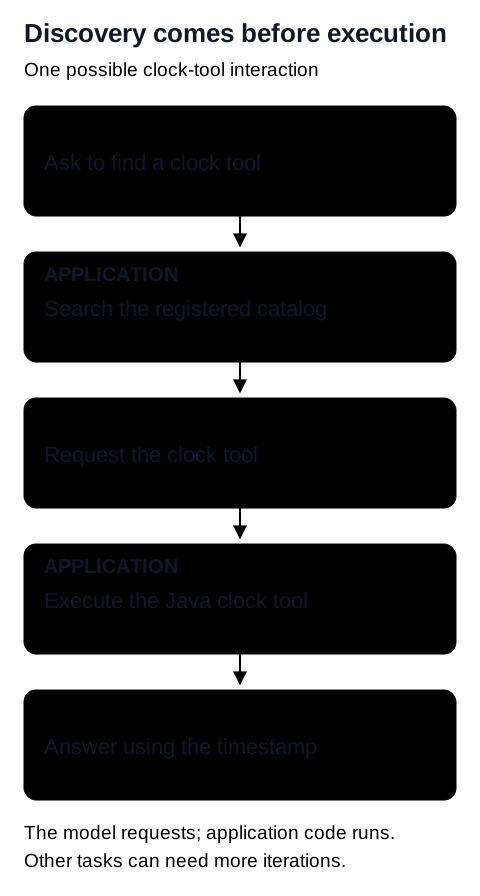
toolSearchTool, then getCurrentDateTime with {}. The application performs each operation. The final model request uses the returned timestamp to answer.Searching finds capabilities; executing the clock supplies the timestamp. The catalog remains available in the application while each model request carries a smaller selection of definitions.
Discovery adds a step. It is most useful when a request needs a small part of a large catalog. With a few compact tools, direct registration can be simpler and avoid that extra round trip.
Add the tool-search advisor
The project's POM already includes the tool-search starter, with its version managed by the Spring AI 2.0.1 BOM:
<dependency>
    <groupId>org.springframework.ai</groupId>
    <artifactId>spring-ai-starter-tool-search-advisor</artifactId>
</dependency>
The controller exposes two routes. The search route explicitly supplies ToolSearchToolCallingAdvisor; the ordinary route does not. Both register the same ten tool classes, each containing multiple tools.
| Route | Request-specific configuration |
|---|---|
GET /?query=... | Tool catalog and token-logging advisor. |
GET /search-advisor?query=... | Same catalog and logger, plus a search advisor using LuceneToolIndex. |
The repository's application.yaml also enables tool search globally. As configured, / therefore uses discovery too. To compare the two approaches, disable global discovery and keep the explicit advisor on /search-advisor.
This shortened adaptation adds a five-result limit. In the controller method, chatClient is already configured:
import java.util.UUID;
import org.springframework.ai.chat.client.advisor.toolsearch.ToolSearchToolCallingAdvisor;
import org.springframework.ai.chat.memory.ChatMemory;
import org.springframework.ai.tool.toolsearch.index.lucene.LuceneToolIndex;

// Inside the request-handling method:
var searchAdvisor = ToolSearchToolCallingAdvisor.builder()
        .toolIndex(new LuceneToolIndex())
        .maxResults(5)
        .build();

return chatClient.prompt()
        .advisors(searchAdvisor)
        .advisors(a -> a.param(
                ChatMemory.CONVERSATION_ID, UUID.randomUUID().toString()))
        .tools(new DateTimeTools())
        .user("Use a tool to get the current UTC date and time.")
        .call()
.content();The one-class snippet shows the wiring. Keep the controller's full catalog when measuring discovery against ordinary calling. Otherwise, changing the available tools would confound the comparison.
Configure discovery globally instead
With the starter installed, these properties enable discovery through auto-configuration:
spring.ai.chat.client.tool-search-advisor.enabled=true
spring.ai.chat.client.tool-search-advisor.tool-index-type=lucene
spring.ai.chat.client.tool-search-advisor.max-results=5
Continue registering tools and supplying ChatMemory.CONVERSATION_ID. Use global configuration or explicit advisor wiring as alternative setups. Keep global discovery disabled for a baseline that is meant to use ordinary tool calling. Tool-search configuration.
Reuse sessions and tune retrieval
The index is scoped by session ID. The example constructs a new advisor and UUID for each independent request. For a conversation across requests, reuse the advisor and a server-controlled conversation ID. Supplying the ID scopes discovery; chat-history persistence is a separate concern.
LuceneToolIndex searches keywords without an embedding model. RegexToolIndex matches tool-name patterns and is the auto-configuration default. VectorToolIndex uses embeddings and needs a vector store.
maxResults(5) caps each search, not every later request's total tool count. Discovered names accumulate by default. referenceToolNameAccumulation(false) keeps the latest search turn's results, trading smaller context for possible rediscovery. A reused advisor also needs an index lifecycle: use eviction configuration or evictSession(sessionId) when a session ends. Search and session options.
Read the token logs as running totals
The project's TokenConsumedAdvisor accumulates usage across model responses. Its order is 0, inside the default tool advisor's loop at HIGHEST_PRECEDENCE + 300. Each route creates a fresh logger instance, so its counters start again for the next request. TokenConsumedAdvisor source.
The supplied application log records two requests on 21 September 2026. Both execute toolSearchTool and then getCurrentDateTime. Each has three logged model responses.
| Request / log thread | Prompt tokens | Completion tokens | Provider-reported total |
|---|---|---|---|
15:47:40 · nio-8080-exec-1 | 1,726 | 70 | 2,277 |
15:48:12 · nio-8080-exec-2 | 1,686 | 67 | 2,096 |
These are the last cumulative entries, not the sum of every logged line. The first request illustrates the difference:
| Response | Next action in the log | Prompt tokens so far | Total tokens so far |
|---|---|---|---|
| First | Execute toolSearchTool | 258 | 330 |
| Second | Execute getCurrentDateTime | 953 | 1,061 |
| Third | No further tool execution shown | 1,726 | 2,277 |
The three model requests contributed 258, 695, and 773 prompt tokens respectively. Their sum is 1,726. Adding the cumulative entries, 258 + 953 + 1,726, would count earlier usage repeatedly.
The search ranked getCurrentDateTime first but also returned getWeather, calculateCompoundGrowth, searchWeb, and estimateReadingTime. The model selected the clock from those candidates. This trace shows successful discovery alongside imperfect filtering, a useful reason to inspect retrieved tools when tuning descriptions and search settings.
The provider-reported totals exceed prompt plus completion tokens by 481 and 343. The log does not break down the remainder, so these results preserve the reported totals without assigning those differences to a token category. The separate null log lines come from the configured getMaxTokens() value, not measured token consumption.
What these measurements establish
The logs show how tokens accumulate through discovery and execution. They do not establish a reduction against ordinary tool calling: both recorded requests use discovery, and the excerpt omits URLs, questions, and model settings.
The repository's globally enabled search advisor is consistent with both logged requests using discovery. The excerpt itself does not identify their routes or the configuration active during capture. The endpoint name alone does not establish which advisor ran.
Measure savings across the complete interaction
For the controller's two-route comparison, set this property and restart the application:
spring.ai.chat.client.tool-search-advisor.enabled=falseThe /search-advisor route keeps its manually registered search advisor. Run the same question with the same model settings and catalog through both routes. Verify from the trace that the ordinary run does not invoke toolSearchTool.
For the example running on port 8080:
curl --get 'http://localhost:8080/' \
  --data-urlencode 'query=Use a tool to get the current UTC date and time.'

curl --get 'http://localhost:8080/search-advisor' \
  --data-urlencode 'query=Use a tool to get the current UTC date and time.'
Compare cumulative input tokens across all model requests, completion tokens, provider-reported totals, elapsed time, and successful tool execution. Keep fresh-session measurements separate from reused sessions. Repeat the comparison with questions needing several tools, since discovery overhead changes with the task.
Input-token reduction (%) =
    100 × (baseline input tokens − search input tokens) / baseline input tokens
Spring's published experiment reported 34-64% total-token savings using 28 tools, with extra model requests for discovery. Those preliminary measurements were not averaged across many trials and are separate from the application logs above. They support evaluating the approach, not assuming the same savings here. Spring's benchmark and methodology.
Keep tool execution under application control
Expose only tools the caller may use, validate arguments at execution time, and return focused results. A tool that sends back an entire database can consume the context saved by selective discovery. Side effects still need the application's authorization, confirmation, and retry rules.
Use compatible, patched dependencies when reproducing the example. Spring AI has published module-specific issues involving PDF ingestion and ONNX caching, with fixes in 2.0.1; Lucene's security history includes CVE-2024-45772 in its Replicator module. These findings do not establish that the clock example is affected. Review the resolved modules against Spring advisories and Lucene notices.
Return to Gen AI for the chapter sequence, or revisit advisor ordering and cleanup when adding your own request instrumentation.