Universal UI with React Native, Next.js, and Astro: My Setup
I wanted to use the same React Native components in my app and in a web documentation site. Maintaining a separate web version of every component felt like work I'd have to repeat whenever the library changed.
I'll walk through the setup I explored with Next.js and Astro, including where rendering worked, where styling needed extra configuration, and where I still don't have a complete solution.
I got the Astro path working in my proof of concept. The Next.js integration was still unfinished for my component stack. That distinction matters before you copy the configuration below.
By Sourabh Malviya.
What I learned
- React Native Web handles rendering; Tailwind integration needs its own setup.
- The Astro/Vite path worked for my proof of concept, with version-sensitive plugin configuration.
- My Next.js errors describe my setup, not a general limit on sharing React Native components.
🎯 The Vision
I set out to build a universal, web-first application that I could later extend to Android and iOS: write the components once, run them everywhere. Two frameworks were on the table: React Native and Flutter. Flutter is impressive, but I wanted a DOM-oriented web UI that fit my existing React work. Flutter supports JavaScript and WebAssembly web builds; WebAssembly alone wasn't the deciding factor. See Flutter web support. React Native fit the React code I wanted to keep using, and react-native-web gave me a route from supported native UI primitives to the browser's DOM. Those were the reasons I chose it for this experiment.
For UI components, I'm a longtime fan of shadcn/ui, so I gravitated towards react-native-reusables (RNR), a library inspired by shadcn/ui and built for React Native that was a joy to work with. But my use case demanded more: complex tables, rich filters, components from a handful of different libraries. I ended up combining components from multiple sources into my own library. That gave me the pieces I wanted, but it also meant the documentation setup had to handle more than a single library's assumptions.
The plan was to document and showcase these components on the web using Fumadocs with Next.js and Starlight with Astro. The architecture felt clean. Then I started writing code.
📖 Background
Expo's Metro-based web workflow can render supported React Native components through react-native-web. Components that depend on native-only APIs still need a web implementation or fallback.
But my use case was different. I wanted to render these same components inside Next.js (specifically for a Fumadocs documentation site) and Astro (for Starlight). These web builds don't use Metro. Astro uses Vite, and my Next.js experiments used Webpack. Next.js 16 now defaults to Turbopack, so the bundler choice must be explicit when using a Webpack-only plugin. See the Next.js 16 upgrade guide.
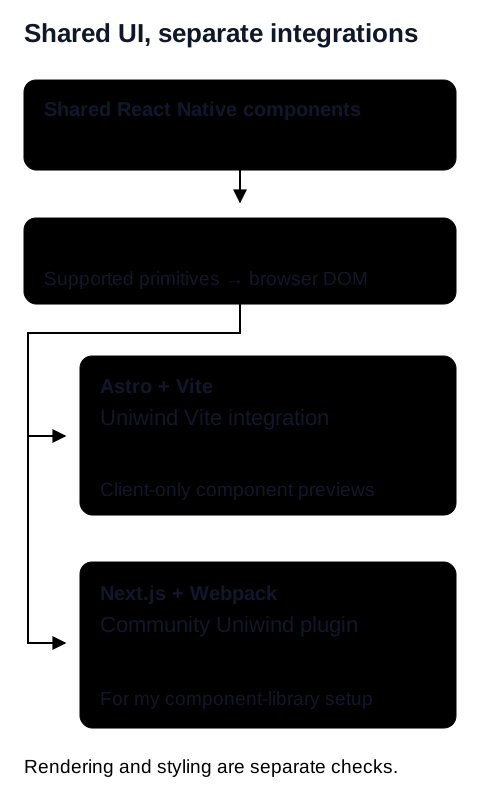
For my first rendering check, a simple primitive was enough. Getting the same component's Tailwind styling to work was a separate problem. I needed to test those two steps independently.
With my Next.js + Webpack setup, Tailwind classes on React Native primitives were ignored. I also ran into the error below while integrating the component library. Import resolution and plugin composition were the areas I investigated, but this message alone doesn't establish which package or transform caused the problem.
Runtime ReferenceError: exports is not defined
...
Switching the documentation experiment to Astro gave me a working path. Uniwind provides a Vite integration. The setup below records how I combined it with Astro; it is not a claim that every package version or React Native library works unchanged.
⚡️ Render React Native components first
These snippets assume an existing framework project. Use compatible, patched versions and keep the lockfile with the example: React and Next.js have published server-side security fixes. A compatibility example is not a reason to stay on an affected framework release.
I'd start with an unstyled Text component and add styling only after it renders. That gives me a smaller problem to debug: if plain text fails, I don't need to investigate Tailwind yet.
🎨 Adding Tailwind
With plain rendering in place, I can add Tailwind. The first detail I'd check is the CSS entry: the file I pass to Uniwind needs to be the same file I import into the page.
The Uniwind Vite documentation lists version compatibility: Vite 7 needs Uniwind 1.2.0 or later, while Vite 8 needs 1.8.0 or later. Match your Astro installation's Vite version rather than assuming any pair will work.
Two Astro details I'd check before copying this
The rnw().filter(...) line is a workaround from my proof of concept. vite-plugin-rnw includes a React plugin internally, while Astro's React integration already supplies one. Filtering nested arrays relies on the plugin's return structure; it isn't a stable public option for disabling React. Recheck that structure when upgrading.
Also, client:only="react" skips server rendering for that component. It's useful for my interactive previews, but the preview's content won't be present in the initial server-rendered HTML. Keep documentation text in Astro markup, and test SSR separately if the shared component must appear without JavaScript.
🤔 Why I used Uniwind
I tried NativeWind first and had styling problems in that experiment. Uniwind's Vite integration got my Astro proof of concept moving. That's an observation about my setup, not a current verdict on every NativeWind release.
The distinction I now check first is which integration belongs to which bundler: Uniwind's documented Vite path, the native Metro setup, or the community Next.js/Webpack plugin.
🗂️ Monorepo class scanning
In a monorepo, I need Tailwind to find the shared components as well as the documentation app. I'd add a @source path relative to the stylesheet. For this example layout, the stylesheet is apps/docs/src/global.css and the UI package is packages/ui/src:
@import "tailwindcss";
@import "uniwind";

@source "../../../packages/ui/src";
Check that path against your own directory tree. Astro's Tailwind setup guide explains its Vite integration.
My original setup also used a lightningcss override while investigating CSS parsing. I wouldn't carry that old pin into every new monorepo. Reproduce the parsing error with your installed versions before adding a workaround.
Once the UI builds, the next monorepo problem is deciding what to ship. My Docker optimization walkthrough covers pruning workspace dependencies for a web app's image.
⚠️ What remains unresolved in my Next.js setup
My component stack uses React Native Reusables and @rn-primitives. With the community Next.js plugin, I ran into the module error shown earlier. I haven't established a general root cause or an end-to-end fix for that combination.
I'd narrow a reproduction in stages: plain Text, styled Text, then the first component that imports the affected primitives. Record the Next.js, React Native Web, Uniwind, and plugin versions at each step. That gives a maintainer something more useful than a large application that fails somewhere during bundling.
🧩 A composed component to try
Once the single Text example works, I'd move to a small card. It adds layout and interaction without introducing a larger component library, which helps me isolate what breaks next. I'd validate it on each target:
// src/components/UniversalCard.tsx
import { View, Text, Pressable } from 'react-native';

type UniversalCardProps = {
  onPress: () => void;
};

export function UniversalCard({ onPress }: UniversalCardProps) {
  return (
    <View className="p-6 bg-white rounded-xl border border-gray-100">
      <Text className="text-xl font-bold text-gray-900 mb-2">
        Universal Component
      </Text>
      <Text className="text-gray-600 mb-4">
        React Native primitives, styled with Uniwind.
      </Text>
      <Pressable
        accessibilityRole="button"
        onPress={onPress}
        className="bg-blue-600 px-4 py-2 rounded-lg items-center"
      >
        <Text className="text-white font-medium">Open details</Text>
      </Pressable>
    </View>
  );
}I'd pass onPress from a React parent. In Astro, that means a small React preview wrapper can own the callback and render the card. A function prop can't be serialized across the Astro-to-client boundary.
Before calling the web version usable, I'd check keyboard focus, button activation, responsive layout, and screen-reader output. I'd check the native targets separately with their Metro/Uniwind setup. Sharing the source helps me maintain the component, but I still need to test how people interact with it on each platform.
🏁 Where I landed
The Astro proof of concept is available at AstroExpo. It shows the direction I was aiming for: shared components displayed inside a web documentation surface.
Getting the primitives to render was the first step. Styling, module resolution, and server rendering turned out to be separate problems. Breaking them apart made the investigation easier to follow.
I'm still interested in the Next.js path. If you've hit the same walls or found a working combination, I'd love to hear what changed in your setup. 🙌